Aborting safely
Audience: operators in a situation where something is wrong. Scope: every abort path, what each guarantees, what state the bundle ends up in, and how to read the manifest afterwards to know what actually happened.
This page tells you what the buttons do. For the underlying safety policy — when the system aborts on its own, what destructive vs. non-destructive means — see safety principles and shutdown sequence.
The three abort paths
| Path | Surface | What it asks the conductor to do | Recorded exit_reason |
|---|---|---|---|
| Stop run | Run-tab button | Graceful shutdown request: set external_stop, let the active procedure unwind, disarm workers, finalize bundle. |
operator_safe_shutdown |
| Emergency stop | Run-tab hold-to-confirm button (1 s hold) | Same conductor shutdown path, stamped as the fast/immediate operator request. | operator_immediate |
| Force-cancel | OS-level process kill (Task Manager, kill -9) — not a UI button |
Cuts the conductor mid-anything. Bundle may not seal; recovery is best-effort on next launch. | n/a (no run-end event recorded) |
The first two are the operator's normal escape hatches. The third is a last resort and is documented under crash recovery.
Stop run
Single click on Stop run during RUNNING. The conductor:
- Stops admitting new method steps (the executor checks
external_stopbetween steps and returns when set). - Lets the active procedure observe
external_stopand run any cleanup it implements. A trailing methodSafeShutdownStepis not automatically jumped to when a method is interrupted mid-step. - Disarms all workers via
pool.disarm_all(grace_s=...). The conductor'sshutdown_grace_sdefaults to 5 seconds; on grace expiry a worker is hard-stopped and the run is marked degraded. - Finalizes the bundle (writer flush, two-stage Parquet rewrite, manifest seal).
- Run-tab badge moves through
DRAINING→FINALIZING→SEALED.
For method runs, put safe cooldown commands in the method or in a
procedure finally block if they must run on abort. For free runs, drive
the setpoint to a safe value via manual controls
before clicking Stop if the adapter itself does not do that in stop().
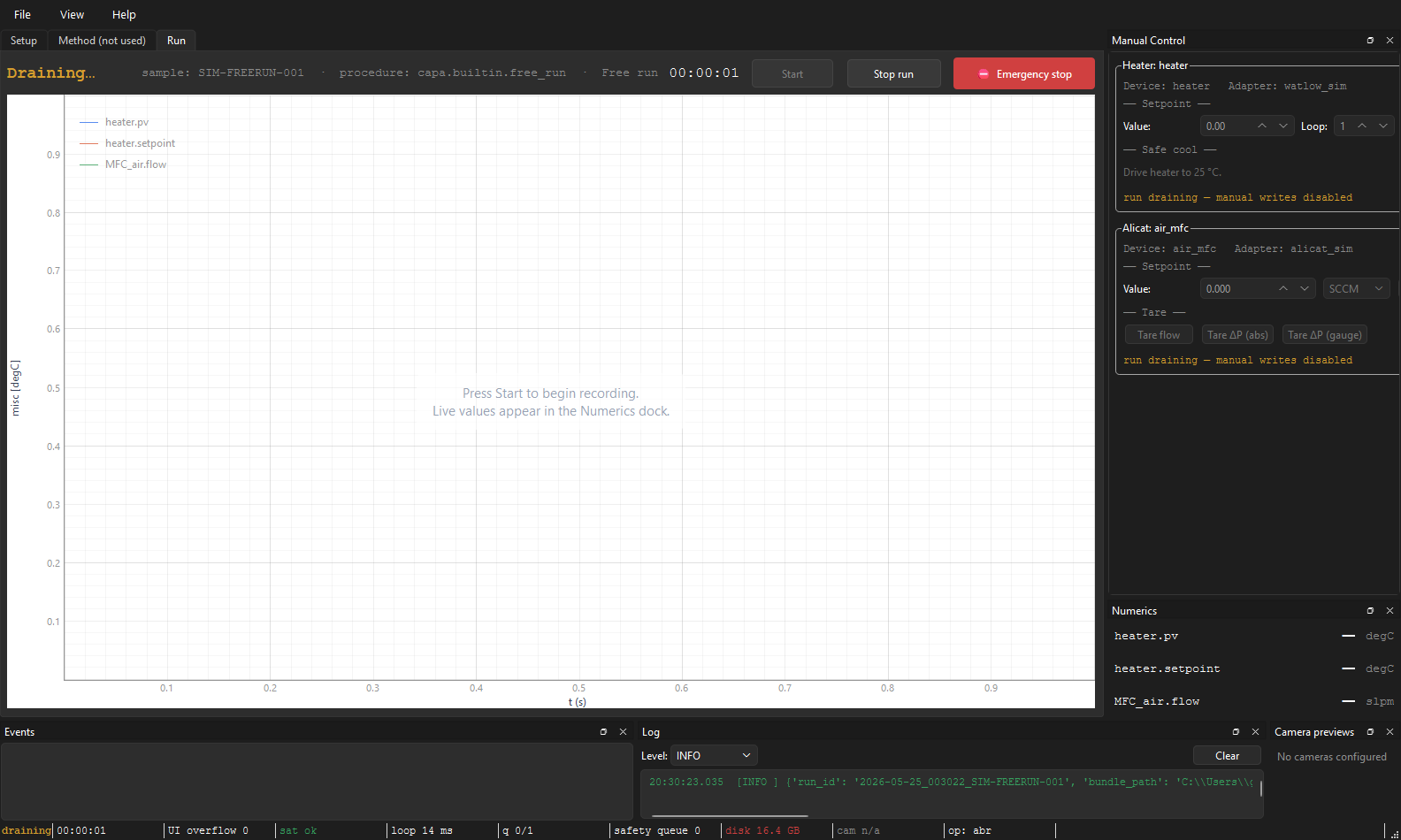
Always safe to click. Even during PREPARING (before the conductor
fully exists), request_abort latches the request and forwards it the
moment the conductor is constructed.
Emergency stop
⛔ Emergency stop requires a 1-second hold. The hold gate is there
because a misclick on a long run is expensive — one second is short
enough to feel responsive in a real emergency and long enough to dismiss
a misclick by releasing.
On confirm, the conductor receives the same stop() call as Stop run.
The difference is the recorded exit_reason — operator_immediate
vs. operator_safe_shutdown — which downstream tooling can read off
the manifest to know which path the operator took. The conductor itself
does not run a different shutdown routine for the two buttons; any
mode-specific cleanup must come from the active procedure.
Force-cancel (kill the process)
If the GUI is unresponsive — Stop and Emergency both ignored — the only
remaining escape is to kill the process: Task Manager → End Task, or
kill -9 <pid> on the terminal.
This leaves the bundle in open or finalizing state. The two-stage
rewrite was designed so a tear mid-finalize is recoverable: the
manifest's bundle_status field tells the next reader what state the
bundle is in, and a partial Parquet at most loses the trailing block.
Recovery walk-through lives in crash recovery.
What ends up in the bundle
The manifest.json records the final state of the run. Three fields
together tell you exactly what happened:
run_status — what the run did
| Value | Means |
|---|---|
running |
Acquisition is active right now. |
completed |
Method or free-run ended normally. |
aborted |
Operator clicked Stop or Emergency. |
crashed |
Recovered/finalized after abnormal termination — the process died, the conductor crashed, or finalize fell into the recovery path. |
bundle_status — what shape the bundle is in
| Value | Means |
|---|---|
open |
Files may still be mid-write. Don't trust the data. |
finalizing |
Sinks closed, two-stage rewrite in progress. |
finalized_unverified |
Data is readable, integrity hashes pending. |
sealed |
manifest.sha256 written; safe to copy/archive. |
verification_failed |
Enough finalized to inspect, but the integrity hash didn't match what was sealed. |
integrity.status — whether the data hashes match
unknown / ok / mismatch / partial. Always check ok before
trusting data from an aborted or crashed run.
Common combinations
| Combination | What you actually got |
|---|---|
completed + sealed + ok |
Best case — the run ended naturally and everything's intact. |
aborted + sealed + ok |
Operator stopped a run cleanly. This is the expected combination after a Stop or Emergency. Recorded data through the abort point is fully trustworthy. |
crashed + sealed + ok |
The conductor died but recovery managed to seal the bundle. Data is trustworthy through the last flushed block. This is what the codebase calls crashed_but_sealed — a recoverable abnormal termination. |
aborted + verification_failed |
Disk problem during seal. The data is probably fine; the hash chain isn't. Treat as suspect. |
crashed + finalizing |
Process died mid-rewrite. Re-launch capa; finalize-on-startup will pick this up. |
running + open |
The bundle's owning process is still alive (or was killed without writing a final state). |
The reviewing a run page walks through how to inspect these fields without opening the bundle in the app.
What you should do, by situation
| Situation | Click | Why |
|---|---|---|
| Run is on schedule, you just want to end it early | Stop run | Cleanest path; procedure cleanup gets a chance to run. |
| Something looks wrong but the rig is responding | Stop run | Capture the data through the moment of concern; investigate from the sealed bundle. |
| Heater is overshooting hard, or a leak is suspected | Emergency stop | Fast operator-request path; still disarms and seals. |
| GUI has hung; buttons don't respond | Kill the process | Last resort. Restart capa, finalize-on-startup will recover the bundle. |
| Something is actively dangerous and you don't trust software at all | Hit the physical e-stop on the rig, then kill the process | The physical e-stop is outside capa's control path and is what you trust. |
See also: The Run tab for the buttons themselves, Manual controls for setpoint changes before Stop, Shutdown sequence for the underlying safety contract, Crash recovery for force-cancel aftermath, Reviewing a run for inspecting the manifest's status fields.