Daily operator workflow
Audience: operators running a sequence of experiments in one session — typically four to ten runs in a morning or afternoon. Scope: the cadence between runs. Loading, editing, applying, running, sealing, re-arming without restarting the app.
This page assumes you've already worked through your first real run once. It picks up at the end-of-day → next-morning hand-off.
Picking up where someone left off
Launch capa. The welcome screen's Recent list shows configs that have been opened recently:
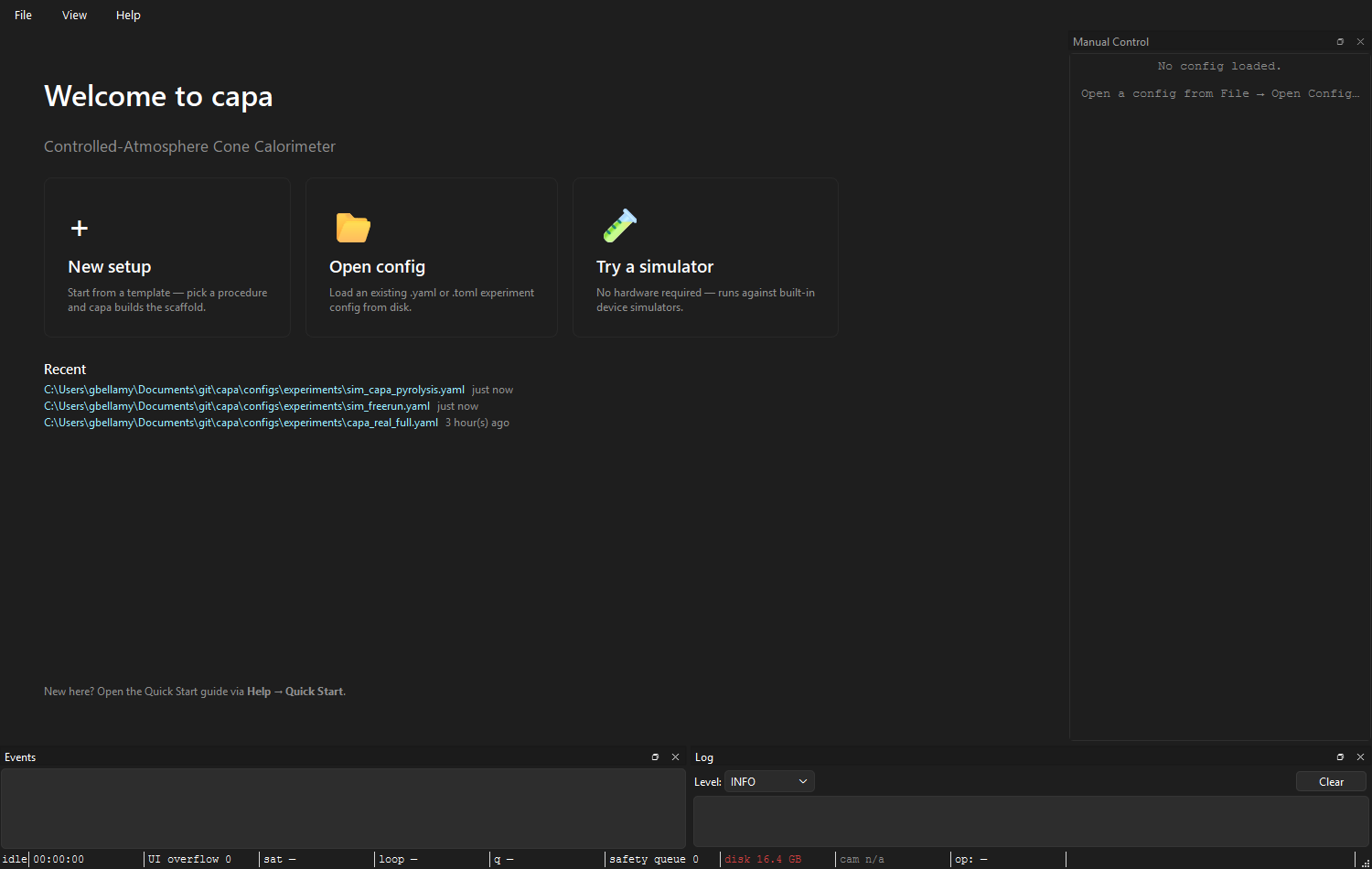
Click the top entry to load yesterday's config. The Setup tab opens with the saved values; the connection strip reads:
◐ Config loaded — Apply & Connect to open hardware.
Hardware is not yet open — capa never auto-connects on launch. Click Apply && Connect and the strip cycles CONNECTING → CONNECTED. You're ready to run.
Editing between runs
The standard between-runs edit is the new sample id and any sample-specific notes:
- Experiment → Operator & sample. Update the sample id.
- Experiment → CAPA Profile. Update specimen mass (post-tare) and anything else that's per-sample.
- The connection strip flips to ◐ Draft has N unsaved edit(s).
- Click Apply && Connect. Strip cycles CONNECTING → CONNECTED.
That's the loop. Five clicks, fifteen seconds.
For setpoint changes you want during a run, don't use Apply — use the manual control dock. Apply is refused mid-run anyway: the strip reads:
🔒 Run in progress — config locked until the run completes.
What Apply & Connect actually does
Every Apply & Connect:
- Validates the composed draft (Setup + Method buffers).
- Closes the previous worker pool.
- Builds a fresh worker pool from the new config.
- Opens every device the new config declares — serial ports, network sockets, NI-DAQ tasks, camera handles.
- Publishes
pool_changedso the manual control dock rebuilds its cards.
This is one path, not two. There is no "hot" vs "cold" mode toggle. The practical speed difference is:
- Same hardware list, parameter-only edit: the close-then-reopen cycle takes a second or two because every port is closed and reopened. There's no shortcut today.
- Different hardware list (new device added, one removed): same close-then-reopen plus any cost from the new device's open path (NI-DAQ chassis enumeration is the slowest).
Future versions may avoid the pool rebuild for parameter-only changes; that's not in today's runtime.
What you don't need to redo
Within one session, after the first successful Apply:
- Hardware discovery. Once the device table matches the rig, you don't need to re-scan unless wiring changes.
- Calibration import. The calibration snapshot persists across Apply cycles. It re-snapshots on each Apply, but you don't have to re-pick the source set.
- Operator id. Stays in the field until you change it. Change it when you change.
- Procedure / profile choice. Sticky across Apply cycles. Change only when switching experiment types.
What does change on every run: the sample id, the bundle output directory (one per run), the elapsed timer.
Reading the recents list
~/.capa/recents.json holds up to 10 entries, most-recent first.
Duplicate paths are deduped (re-opening the same config bumps it to
the top instead of growing the list). Paths whose files have been
deleted are filtered out at read time — the file isn't eagerly cleaned.
If the recents list shows a path that no longer exists on disk, it'll silently disappear the next time you open something — no action required.

The Open ▾ → Recent submenu in the Setup tab toolbar is the same list.
Reviewing during the day
The status bar's bundle: pill always points at the most-recently
sealed bundle. To inspect it:
- Help → Open logs folder opens the runs root in your OS file browser.
- For a queryable view across the day's runs, use the
capa catalog CLI — it reads the
runs.sqliteindex that every run writes into.
There's no in-app sealed-bundle browser. See reviewing a run for the external tools.
Wrapping up at end of day
When you're done:
- Make sure the last run sealed (
Sealedbadge,(completed)or(aborted)on the run-id line). - Close capa (window close, or
Ctrl+Q). TheShutdownCoordinatorcleanly closes the worker pool — serial ports are released, NI-DAQ tasks ended, camera handles closed. No data is lost; the last run was already sealed before you got here. - Power down or leave running per your lab's policy. capa doesn't care either way; the next launch picks up from the recents list.
If you killed the process (Task Manager / kill -9) instead of closing
cleanly, see crash recovery —
the next launch's finalize-on-startup pass picks up any bundle stuck in
finalizing state.
See also: Your first real run, The Setup tab, Manual controls for between-runs device commands, Reviewing a run.